> ## Documentation Index
> Fetch the complete documentation index at: https://okara.ai/docs/llms.txt
> Use this file to discover all available pages before exploring further.
# Dashboard Overview
> Everything on your dashboard and what each panel does.
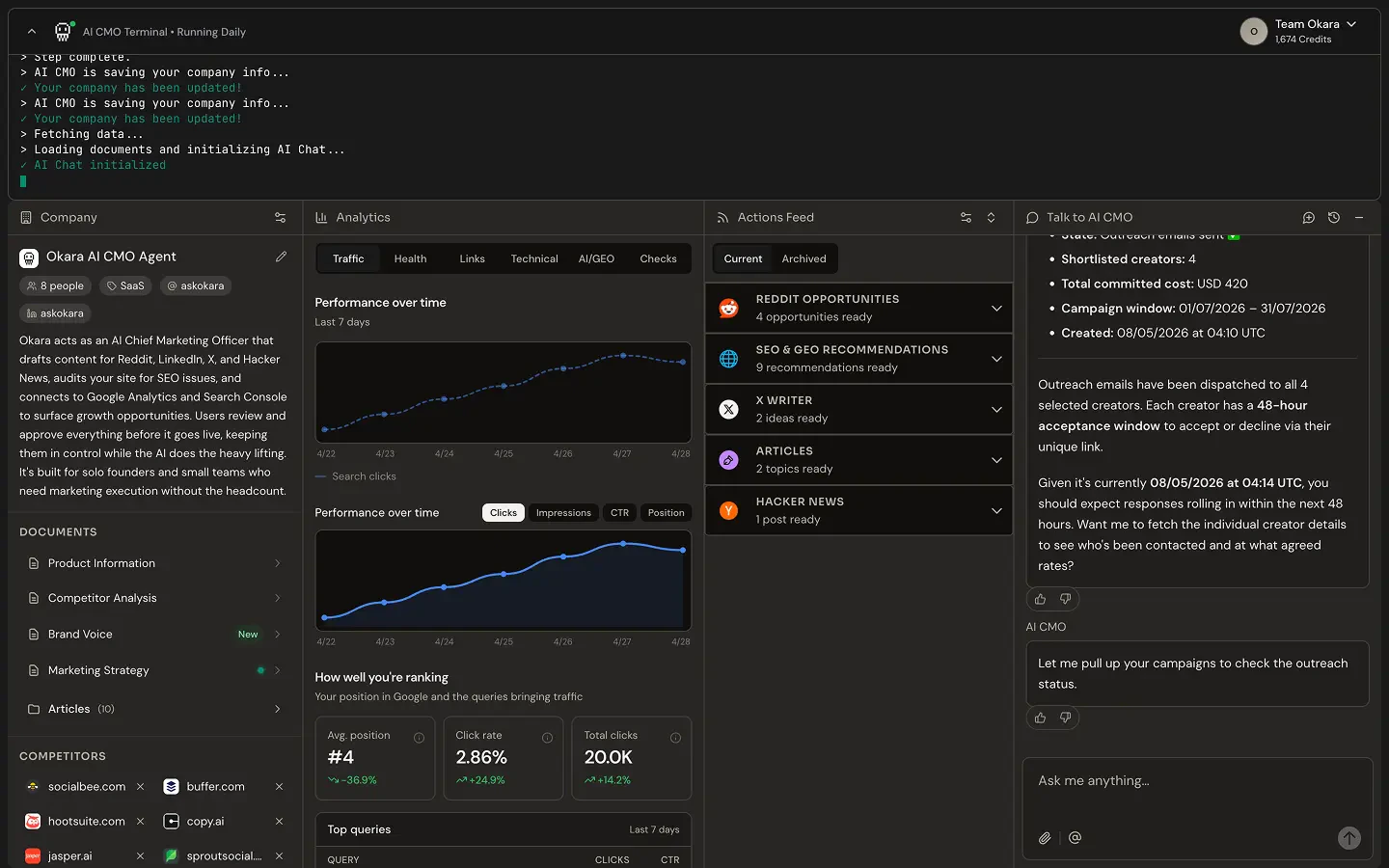
Your dashboard is the home of your AI CMO. Everything you need to see, review, and act on is here, updated automatically every day.
 ***
## Panels
Live activity feed showing what your agent is doing and has done.
Your product profile, brand voice, competitor analysis, and strategy documents. The foundation every agent draws from.
Five tabs in one panel: SEO health, GEO visibility, backlinks, technical audits, and traffic from Google Analytics and Search Console.
Your daily queue of opportunities across all active agents.
Ask your CMO anything or get a daily rundown of what's new.
***
## Panels
Live activity feed showing what your agent is doing and has done.
Your product profile, brand voice, competitor analysis, and strategy documents. The foundation every agent draws from.
Five tabs in one panel: SEO health, GEO visibility, backlinks, technical audits, and traffic from Google Analytics and Search Console.
Your daily queue of opportunities across all active agents.
Ask your CMO anything or get a daily rundown of what's new.